Shopify product photos
One product's photos are the easy part. The catalog is the problem.
A shoot you can justify for one product is a different decision at forty. Upload one photo per product and get a set of staged scenes back — priced per product, not per photo.
Priced per product, not per photo · 3 free to try · No card required
The problem isn't one listing
Multiply one product's photo problem by your whole catalog.
A single product needs a few good photos to sell — something clean, something styled, something showing it in use. That is already work if you are not a photographer. Now do it twelve times. Or forty. The hard part was never one listing. It is that every product needs its own set, and most stores carry more products than they have time or budget to shoot properly.
Photographer figures are typical published market rates for commercial product photography, not quotes — yours will vary by category and shot count.
The one Shopify-specific thing worth knowing
Shopify won't reject a mismatched photo. Your collection page will still look mismatched.
Shopify's image guidance is generous rather than strict. Its documentation says product and collection images need to be “smaller than 20 MB” and can be “any size up to 5000 x 5000 px, or 25 megapixels”, that for a square image “a size of 2048 x 2048 px usually displays best”, and that the preferred formats are “PNG, followed by JPEG”. None of it is enforced. A photo well outside those numbers uploads, displays and sells.
Where it does show is the collection page — the grid a shopper sees before clicking into any product. Shopify recommends you “use a consistent aspect ratio, or height-to-width ratio, for all the images that you add as your featured, or main, images”. Nothing stops you ignoring that. But a grid where one product is square and the next is a tall portrait reads as uneven before a shopper reads a word, even when every photo is fine on its own product page.
We give you no setting for pixel size or file format, and aspect ratio is not a switch either — it is built into each scene preset, some square and some taller. What you choose is which presets you use. Pick featured images from one ratio and the grid holds together, even though every product was staged separately from its own photo.
Mixed ratios
Three products, three shapes. The row never settles.
One ratio
Same three products. Nothing changed but the shape they share.
What one product's photo becomes
One photo in. A set of scenes out — for each product.
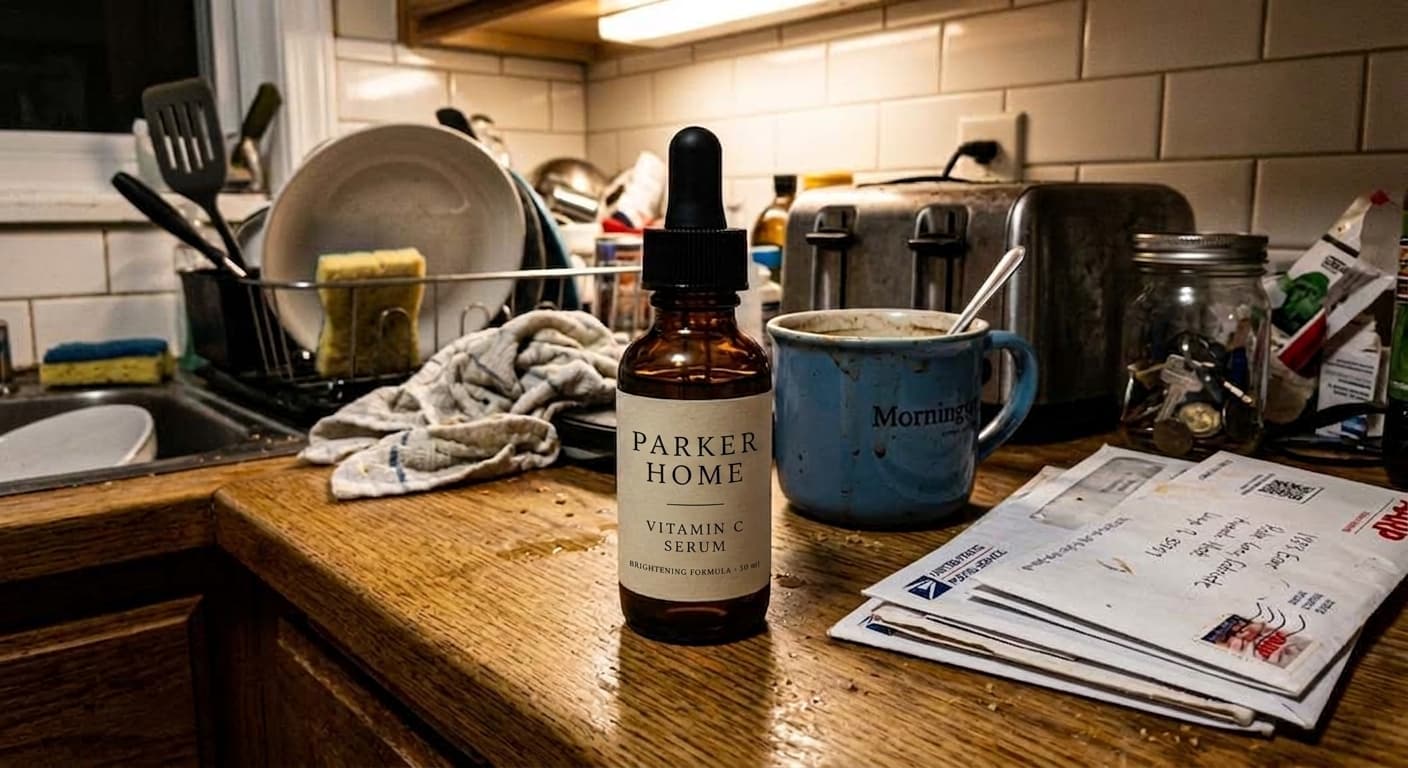
This is the photo that went in. Taken on a kitchen counter, with the dish rack, the toaster and the mail still in frame.

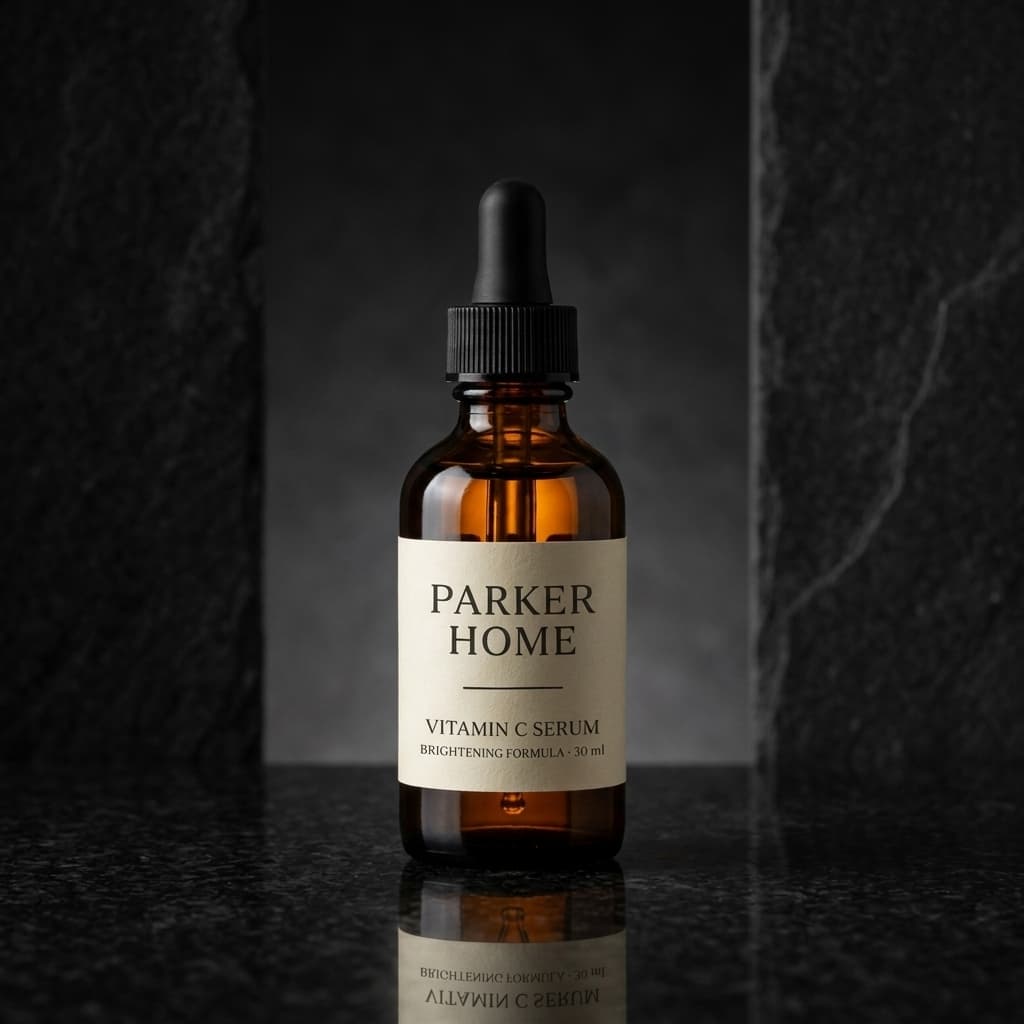
Plain studioProduct forward, reads at any size 
Minimal deskStyled, without looking staged Dark and reflectiveFor a higher price point 
SeasonalA holiday set without a holiday shoot 
In useThe dropper, on a bathroom counter
That is one product staged five ways, not a collection page — one product is all this stages at a time, on its own photo. What changes at catalog scale is how many products you run through it, not what each run gives you back.
Before you publish any of it
Check every image against your original. Across the whole catalog.
Check the fine detail
Generation is not pixel-perfect on the smallest things — label text, a logo, the exact shade of a cap. Across five products that is five originals to check against, not one. Compare each image before it goes near a product page.
Two free redos, per image
Wrong background, wrong crop, a color that drifted — redo it. You see every version side by side and pick the one that is right. Downloading is what makes an image final.
The product stays the product
Shape, color, proportion, label text and packaging are read from each product's own photo and go into every scene it is staged in. The background and the light change. The product does not.
No card required · Your own photo · Review before you publish
Questions
Running this across a store.
- What size and format should my Shopify images be?
- Those are Shopify’s recommendations rather than anything we set. Shopify’s help documentation says product and collection images must be "smaller than 20 MB", can be "any size up to 5000 x 5000 px, or 25 megapixels", and that for a square image "a size of 2048 x 2048 px usually displays best", with preferred formats "PNG, followed by JPEG". We give you no control over output pixel size or file format, so if you need to hit an exact target, check the downloaded file yourself. Shopify’s own docs are the current source; this is a snapshot.
- How does pricing work across a catalog — per photo or per product?
- Per product. A pack covers a set number of products: five for $79, ten for $139, with six scenes for each. Packs do not expire, so a large catalog can be worked through a few products at a time rather than all at once.
- Do I need to shoot every product the same way?
- No. One clear photo per product is enough, and the source photos do not need to match each other. A phone shot from March and one from last week both work. Sharp and well-lit matters; styled does not.
- Will my collection page look consistent?
- That depends on which scenes you pick, and it is worth deciding deliberately. Each scene preset has its own aspect ratio built in — some square, some taller — so choosing featured images from one ratio is what makes a grid line up. Products staged separately, on different days, from different photos still read as one set if the featured images share a shape.
- Do I need to install a Shopify app or connect my store?
- No. You get image files. Download them and upload them to Shopify the way you would any product photo — there is no app to install and no store permissions to grant.
Twelve products or two hundred — the same process, once per product.
Start with the product that needs it most: one photo, three free scenes, no card. When you are ready for the rest of the catalog the packs are priced per product — five for $79, ten for $139 — and they do not expire.
Selling somewhere else too? Amazon has rules of its own and Etsy is a different problem again.